Docker Build Cache Mechanics and Kubernetes Deployment
Treating container builds as dependency graphs and carrying the result into predictable deployments
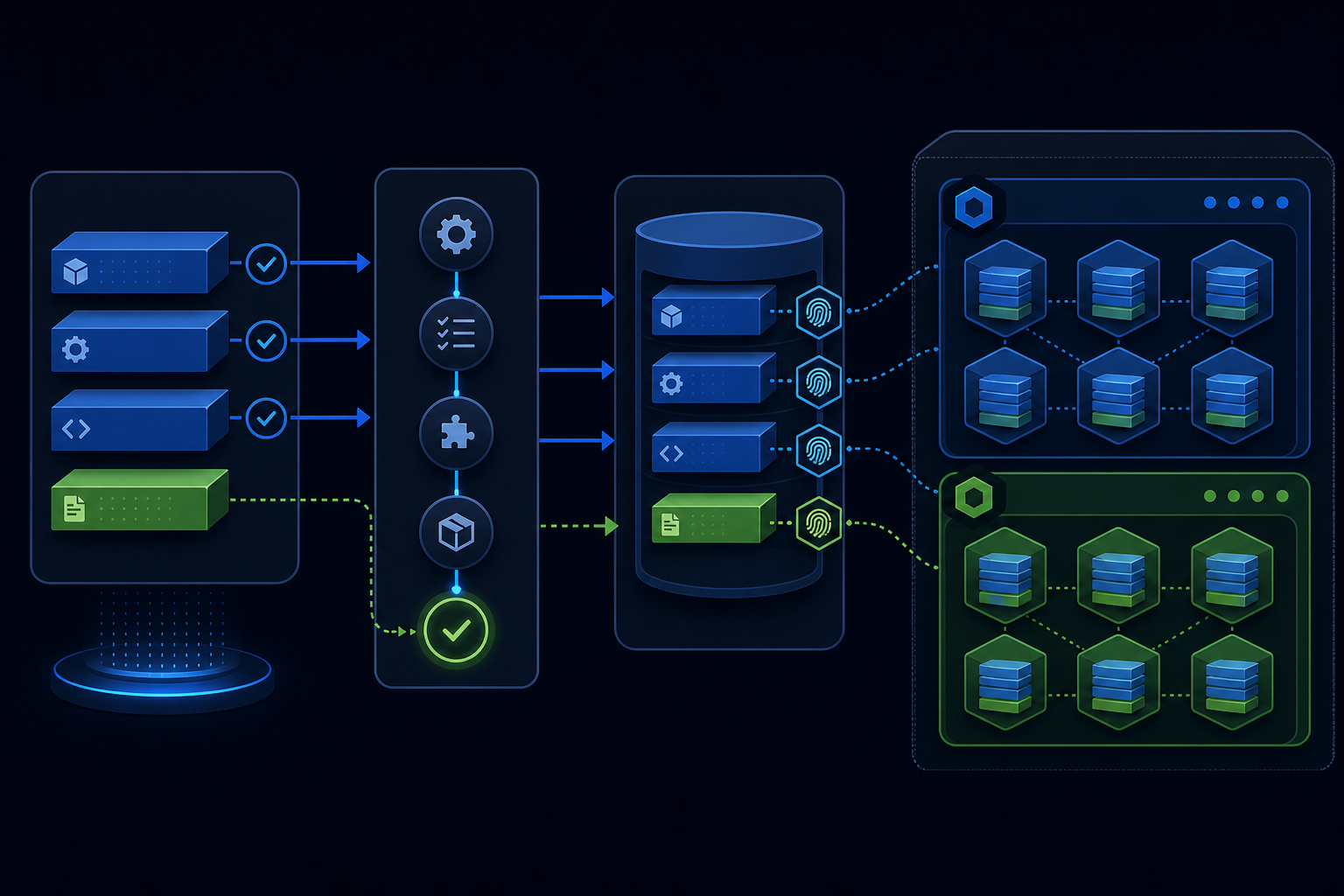
A Dockerfile can produce a correct image while wasting minutes on every commit. The usual cause is an inaccurate dependency graph encoded through COPY and RUN.
Consider an image with OS packages, Node.js and pnpm, Python and uv, local Python workspace packages, generated manifests, compiled frontend assets, and runtime files. A normal code change could trigger both JavaScript and Python dependency installation. Rebuild cost should instead be proportional to what changed.
Scope: The checked CI implementation used Buildx with the GitHub Actions cache backend. Registry caching and the Kubernetes sections below are design recommendations, not deployment results. The snippets illustrate target cache boundaries and must be validated against the package-manager versions and application layout in use.
A Dockerfile is a dependency graph
Docker evaluates layers in order. Once a cache key changes, later layers normally need reconsideration. This pattern therefore destroys useful boundaries:
COPY . .
RUN pnpm install
RUN uv sync
RUN pnpm run build
Any source, documentation, test, or metadata change affects COPY . ., invalidating installs even when neither lockfile changed. Copy each input immediately before the first command that needs it:
base OS
  ├── system packages
  ├── Node and pnpm
  ├── JavaScript manifests -> pnpm install
  ├── uv binary
  ├── Python manifests -> third-party uv sync
  ├── local Python package -> workspace uv sync
  ├── application config -> asset discovery
  ├── frontend source -> frontend build
  └── runtime files
Cache expensive, stable work early
Here, pnpm install was materially slower than uv sync, so it received a strong early boundary:
COPY package.json pnpm-lock.yaml /app/assets/

RUN --mount=type=cache,target=/opt/.cache/pnpm-store \
    cd /app/assets && \
    pnpm install \
      --store-dir=/opt/.cache/pnpm-store \
      --frozen-lockfile \
      --shamefully-hoist
This layer changes only when a manifest, the command, relevant environment, or an earlier layer changes. Python and template edits no longer reinstall the pnpm tree.
A floating tool image such as uv:latest accepts unreviewed changes and weakens reproducibility. Pin a version and update deliberately. Placing an intentional floating tag after an expensive stable layer can limit invalidation, but not its correctness or supply-chain risk.
Separate third-party and workspace Python dependencies
Third-party packages from pyproject.toml and uv.lock change less often than the local package. Installing both after copying application source makes every code edit invalidate the whole environment.
BuildKit bind mounts allow manifests to participate in a command without persisting them in that layer:
ENV UV_CACHE_DIR=/opt/.cache/uv \
    UV_LINK_MODE=copy

RUN --mount=type=cache,target=/opt/.cache/uv \
    --mount=type=bind,source=uv.lock,target=uv.lock \
    --mount=type=bind,source=pyproject.toml,target=pyproject.toml \
    uv sync \
      --no-dev \
      --no-install-workspace \
      --no-editable \
      --frozen
Then copy and install the local workspace:
COPY pyproject.toml uv.lock ./
COPY application ./application

RUN --mount=type=cache,target=/opt/.cache/uv \
    uv sync --locked --no-dev
The first command installs stable third-party dependencies. The second installs the changing workspace package and leaves copied manifests available to later commands. This separates external dependencies from local source.
Layer cache and package-manager cache are different
These mechanisms solve different problems. A layer-cache hit reuses the complete output of a RUN; the command does not execute. A BuildKit cache mount provides reusable downloads when it must execute:
RUN --mount=type=cache,target=/opt/.cache/uv ...If uv.lock changes, the layer correctly misses, but uv can reuse downloaded wheels; pnpm can likewise reuse its content-addressable store. Layer caching usually saves more time, while mounts reduce necessary misses.
The mounted directory must match the package manager’s configuration. An unrecognized environment variable only creates the appearance of caching. Verify the effective path or pass it explicitly.
Generated manifests complicate otherwise clean builds
Some frameworks modify package.json during asset discovery. An early install may use the committed lockfile, then generation overwrites the manifest and a later install finds a mismatch.
Make the contract explicit: install committed manifests early, run backend asset discovery, restore the manifest expected by the lockfile, and compile without reinstalling. Generic COPY guidance is insufficient when build commands mutate inputs.
Use frozen lockfiles in CI
Container builds should validate committed lockfiles without updating them:
pnpm install --frozen-lockfile
uv sync --locked
For uv workspaces, an initial dependency-only layer may require --frozen --no-install-workspace because workspace member manifests have not been copied yet. After copying the complete workspace, run uv sync --locked so stale project metadata fails the build.
Locked installs keep the reviewed lockfile authoritative and expose hidden manifest generation before deployment.
Keep unrelated files out of the build context
Even a well-ordered Dockerfile can lose efficiency when broad COPY instructions receive noisy input.
A useful .dockerignore excludes:
.git/
.venv/
node_modules/
**/node_modules/
__pycache__/
.pytest_cache/
.mypy_cache/
.coverage
htmlcov/
*.egg-info/
.DS_Store
This shrinks the context, prevents noisy invalidation, and avoids copying local artifacts. It is not a secrets-management boundary: never pass credentials through COPY or ARG; use BuildKit secret mounts. Tailor recursive patterns such as **/__pycache__ and **/*.egg-info to the repository, and never substitute a local virtual environment for dependencies installed in the image.
The optimized .dockerignore must exist on the CI branch; reviewing only a local Dockerfile can misrepresent cache behavior.
Copy runtime-only files late
If templates are not frontend inputs, changing one should not rebuild JavaScript. Copy served static files after compilation and process configuration after installation. Place translations according to whether compilation consumes them; keep deployment metadata after expensive steps unless required.
For every COPY, ask:
Which exact future command consumes this file?
If the answer is “none until runtime,” copy it near the end.
Export cache from ephemeral CI runners
Local layers remain on disk; hosted CI runners are disposable and need an external cache.
With GitHub Actions:
- uses: docker/setup-buildx-action@v4

- uses: docker/build-push-action@v7
  with:
    push: true
    tags: ${{ steps.meta.outputs.tags }}
    cache-from: type=gha
    cache-to: type=gha,mode=max
A registry-backed alternative is:
cache-from: type=registry,ref=ghcr.io/example/app:buildcache
cache-to: type=registry,ref=ghcr.io/example/app:buildcache,mode=max
mode=max exports intermediate layers, including expensive dependency layers absent from the final output.
Registry caching needs authentication and package-write permission; GitHub Actions caching has different permissions and storage limits. Review access when changing backends to avoid failed exports or excess workflow permissions.
External cache export preserves BuildKit instruction and layer cache. It does not preserve the contents of RUN --mount=type=cache mounts on fresh hosted runners by default. If a dependency layer misses, its pnpm or uv download cache may therefore be cold unless it is persisted separately.
Action tags and cache behavior are version-sensitive. Check current primary documentation; security-sensitive workflows may pin reviewed commit SHAs instead of mutable major tags.
Diagnose cache misses instead of guessing
When caching seems ineffective, inspect BuildKit’s plain progress output:
docker buildx build --progress=plain .Find the first unexpected non-cached instruction; later misses are consequences. Common causes are an early COPY . ., unignored artifacts, floating images, changed ARG or ENV, generated manifests, branch-specific cache references, missing export permission, the wrong package-manager cache path, or an architecture mismatch.
Test one class at a time: Python source, frontend source, templates, application config, uv.lock, and pnpm-lock.yaml. Each log should show the expected invalidation boundary.
What this changes in Kubernetes
Docker build cache reduces CI build time; it does not make application code run faster in Kubernetes. Image structure can still affect operations.
Faster image pulls
Registries and runtimes store layer blobs by digest. If a node retains referenced blobs, it downloads only the missing ones, reducing startup time, rollout duration, bandwidth, and warm-node recovery. This is not guaranteed on new nodes or after garbage collection.
Build-cache invalidation and runtime layer reuse are separate concerns. An early change forces dependent build steps to rerun, but does not prove that every emitted layer blob will contain different bytes. Isolating volatile application files in small, late layers maximizes the opportunity for reuse.
Deploy immutable references
CI may publish convenient tags such as latest, but Kubernetes deployments should preferably reference a release tag that is never overwritten or an image digest:
image: ghcr.io/example/app@sha256:<64-hex-digest>This makes rollbacks deterministic and prevents nodes from resolving a mutable tag at different times.
Build-cache tags such as buildcache are build infrastructure. They must never be deployed as application images.
Separate web and worker workloads
Applications often run asynchronous indexing, file processing, email, or scheduled jobs. A useful pattern is a web/API Deployment plus worker Deployments for selected queues, with independently configured concurrency, resources, and scaling.
For example, after replacing the image digest and application module:
apiVersion: apps/v1
kind: Deployment
metadata:
  name: indexing-worker
spec:
  replicas: 2
  selector:
    matchLabels:
      app: indexing-worker
  template:
    metadata:
      labels:
        app: indexing-worker
    spec:
      containers:
        - name: worker
          image: ghcr.io/example/app@sha256:<64-hex-digest>
          command:
            - celery
            - --app=myapp.celery
            - worker
            - --queues=indexing
            - --concurrency=4
When the workload justifies them, separate queues and Deployments reduce worker-pool contention and allow independent tuning. Node-level CPU isolation still depends on resources and placement. One image can serve several roles: build once, promote the same digest, and vary command and configuration.
Set resources by workload, not image
Web and workers may share an image but need different resources. An indexing worker might use:
resources:
  requests:
    cpu: "1"
    memory: 1Gi
  limits:
    cpu: "4"
    memory: 4Gi
A web Deployment may favor more replicas with smaller requests. Requests influence scheduling; limits impose memory ceilings and CPU throttling. Scaling changes only when an HPA or another autoscaler is configured. These values are illustrative; measure production workloads.
Probes must reflect startup behavior
Optimized pulls do not eliminate initialization time. Use startupProbe for slow startup, readinessProbe for traffic admission, and livenessProbe for genuine deadlock recovery. A strict liveness probe used as a startup timer can create rollout restart loops.
CI speed and rollout safety are separate concerns
A fast build must still pass tests, vulnerability and provenance checks, publication, immutable-digest deployment, readiness verification, controlled rollout, and rollback on failed health checks. Caching must never bypass validation; it should reuse deterministic outputs whose inputs have not changed.
A useful cache has explainable misses; caching every Docker instruction is unnecessary.